Speaking of compression, X-Plane doesn’t compress all textures…even if “texture compression” is on, we leave uncompressed certain textures that are flagged. A rough list:
- Most textures in the sky, like clouds and color stripes, have a lot of alpha and get wrecked by compression. They get exempted.
- Anything related to the 2-d panel, maps, and the UI get exempted.
- Some of the overlays like rain and snow, smoke puffs, and lights.
- Taxiway signs get exempted…S3TC does a number on letters and numbers.
Try this experiment: take three screen-shots (use ctlr-; to get a stable, clear view), with these settings:
- Extreme res, with tex compression
- Extreme res, without tex compression
- Very high res, without tex compression
Now consider the effect on VRAM. Each time you go down a texture resolution level, tex sizes are cut in half, and you cut VRAM use by a factor of 4.
If you use texture compression, you cut VRAM use by a factor of 4 for textures with alpha and a factor of 6 for textures without alpha. (Some textures are unaffected because they are internally marked as “never compress”.)
Now look at your visual results. I would argue two things:
- At extreme res, turning off texture compression doesn’t make the image a whole lot nicer. (It does make the machine a whole lot slower!)
- Texture compression is a lot nicer than going down a res level.
I suspect that if your machine can’t handle extreme res, you can get similar results running the whole experiment down one notch.
I think that almost everyone who has a limited machine is running with texture compression these days – we default with it on and it helps fps. I would only argue that any users who are running with a huge machine and compression off might consider turning it back on. It doesn’t hurt much and it does make the machine run faster.
(Even if you have a ton of VRAM, X-Plane can be limited by how fast texture data transfers from VRAM to the GPU, within the card. Texture compression helps this.)
Every now and then someone sends us this:
http://www.xtremesystems.org/forums/showthread.php?t=117500
The question is of course, why doesn’t X-Plane look like that yet?
Now there’s a lot of reasons why flight simulators don’t look like first person shooters…you can definitely optimize any game content for a specific viewpoint — X-Plane’s lack of constraints on the camera position (you can put the camera quite literally ANYWHERE on the Earth at any time of day, atmospheric condition, and orientation) means that there are going to be views that don’t look so hot. And the global scope of X-Plane means that we have to focus on quantity to a certain extent over quality. (If we made KSBD look totally awesome and didn’t ship any state but California in global scenery, where would we be.)
I’ve been working lately on pixel shaders and lighting…when you look at those shots, the total integration of a number of great lighting effects is responsible for a lot of the look. But…I think there’s a more fundamental issue that pixel shaders and carefully made content wouldn’t address.
Simply put, X-Plane’s LOD system isn’t scalable enough.
In order to get images that look that good you need to put a huge amount of detail up close near the camera, where the user can see it, but not put that detail in the background. (Imagine if every tree in those scenes was done in the detail of the foreground – the polygon count would be unmanageable.)
But X-Plane’s scenery SDK (the interface by which scenery content is specified to X-Plane, in other words, “the file formats”) lacks really strong LOD capabilities.
- The terrain mesh is fixed – you can use LOD to eliminate overlay details, but you can’t actually simplify terrain.
- The cost of LOD in objects is high enough to prohibit really gradual LOD. No morphing is provided.
- Textures are mipmapped but loading is not variable, so our VRAM budget doesn’t benefit from LOD and locality of textures in X-Plane space.
- Generated geometry (roads, trees, etc.) don’t have any LOD except “eliminate whole feature”.
- There is no far view of 3-d clouds.
- Airport layouts are tessolated at only one complexity.
I could go on and on…the bottom line is, X-Plane’s rendering model is very static.
Why did we do that? Well, it seemed like a good idea at the time. In particular, recalculating LOD is very expensive on the CPU and at the time we had only one core. Recalculating LOD would cost more in lost fps than it would benefit in offloading the GPU. So we went for static meshes that we could blast out to the card “real fast”.
What you might not know about those screenshots is what kind of hardware it’s running on:
http://www.gameklip.com/v/1606/
Yep…four cores, and overclocked by over a ghz. (I can only speculate that shortly after the clip ends the machine caught on fire. 🙂 In a multicore environment we can apply additional CPU resources to dynamically rebuild the environment to increase the “LOD range” (difference between the near and far view).
In fact, we already started to do that! In X-Plane 830 we modified the sim to build 3-d content (roads, forests, etc.) on a second core while flying, instantiating only the close ones. This saved RAM and improved the overall performance of the sim, and it increases our LOD range.
(Even if something isn’t drawn, it has a cost just to exist – by saying that things that are really far away don’t even exist we improve performance.)
As you can see from the above list, there’s still a lot to do on the LOD front. But the scenery system is continually growing – new features for the various primitives and improvements to the engine will let us continue to improve sim efficiency.
Something I’m seeing now that WED is in beta: airport layouts with the entire taxiway structure made from one really complex polygon.
I’m not really sure if this is a good idea. First the potential problems:
- I suspect that the creation of the taxiway layouts can get slow when the number of sides in the airport layout is really huge and there are holes. I don’t know this for a fact because we let the OpenGL libraries do the heavy lifting. Because this loading is done on a second CPU, it might not be noticeable to all users.
- The pavement can have only one texture direction per polygon, so multiple polygons may be necessary.
- Certainly in WED having a few large complex polygons slows down editing — if all else is equal, the tools work better with smaller polygons.
Now…overlapping pavement is generally bad (that is, there is a performance cost), but more sides are also expensive. More thoughts:
- The more square feet of overlap, the worse. So a small overlapping intersection is not so bad, but avoid layering a huge polygon on top of another huge polygon, which just strains the video card.
- Fewer segments are better. Consider two crossing taxiways…8 segments with overlap, but 12 by making a plus.
- But wait – the above example is misleading…if you need to change the light types so the blue taxiway lights don’t cross the intersection then you’ll need to add 4 more segments, so now it’s 12 and 12 – a wash. (In this case, having one big polygon is probably easier to manage.)
And for performance…
- Try going to your layout from far away and watch the last step of loading…if it starts to take a long time to “preload” things it means your layout might be a bit complex.
- Do not expect X-Plane to become faster at loading airport layouts…the limiting factors are proportional to complexity, so if you have a killer polygon now it’ll be pretty expensive later too.
One other note, from a conversation with Tom…WED splits vertices into a fixed number of segments (per zoom level) so splitting a bezier makes it smoother. X-Plane does not! X-Plane splits beziers based on the overall curvature, so adding more nodes without changing the shape has no effect.
So please do not try to use the split command to make X-Plane “smoother”. We’ll provide a rendering setting for this some day. The current value was chosen because anything smaller looks awful and you have to make it a lot bigger (read: a lot slower fps) to get an even marginal visual improvement.
Some very advanced users have asked: can we change lights.txt. The answer is: please don’t.
Lights.txt is not a part of the “scenery SDK”, that is, it’s not a file whose format we will keep the same and allow you to modify. (The fact that it isn’t accessible via the library system is an indication of our intention NOT to make it part of the scenery system.)
The problem is basically this: lights.txt translates named lights into the inputs to our pixel shaders for the hardware-accelerated lights. That pixel shader is really new and likely to change a few times. If the shader changes, we might need new parameters not in lights.txt, requiring a fundamental format change.
For example: those who have poked in the named lights file have noticed that the hardware lights can either have directional or flashing properties. This is because they run on two different shaders, each taking only four input values. This was done a while ago, when we were using low level assembly language shaders. In the future we might merge the two shaders and have 8 params per light. This would give us more flexibility (directional flashing lights), more bus usage (pushing 8 params per light instead of 4) and fewer state changes (we have to change shaders right now).
My point is: we can’t predict what will happen, so we can’t safely expose these parameters. The best thing to do is: email me and request named light types. We can easily have hundreds of named-light types (see how many there already are just for airports!).
Named lights make our lives easier because it tells us WHAT to draw but not HOW to draw it. So when we put in the next evolution of the lights code, we can remap the named lights to look the best they can for the new technology, instead of worrying about how to map the old params to the new ones.
(I appreciate the input from the users who emailed me about this — it gives me more insight into what extensions to the scenery system would be useful.)
Austin and I were running some numbers on the KSBD demo area DSF as part of a discussion of how instancing will someday allow X-Plane to render more objects. (Instancing is the ability to render multiple simple objects with a single instruction to the GPU…the requirement of one command to the GPU per object means that total object count is bottlenecked by the CPU->GPU connection.)
Here’s some numbers:
KSBD contains 868,220 mesh vertices – at 32 bytes per vertex, we have about 27 MB of geometry per DSF. In one view we picked, about 20% of those vertices were on screen. (But since there are six DSFs loaded, really only about 3% of a DSF mesh is seen at one time at lower altitudes.)
KSBD contains 153,816 objects. Near the airport, we average about 238 vertices per object. (This is a GOOD number – less than 100 vertices would imply that we aren’t sending out enough vertices for each command to draw.) But this means that if we were to simply store all of the objects as one huge object, we would have 1.1 GB of object memory! This is why you can’t just make a single huge object for the world. 🙂
(X-Plane of course stores each OBJ file once, saving a lot of memory. But then we burn CPU power telling each OBJ to be drawn over and over in many places.)
It also explains why forests keep causing people to run out of memory. Consider that only about 3% of the mesh may be visible (when we’re at lower altitudes, where you can see the trees). This means that we need about 30x as much memory to storage geometry as the card can draw. With cards so fast, we easily run out of memory before we max the card out.
Panels and airplanes aren’t really my thing. But we’re using the OBJ engine more and more in aircraft, blurring the lines between scenery code and aircraft code.
In X-Plane you can actually use the panel texture in any object. Pleaes don’t do this! There are two cases:
Airplane Objects
With X-Plane 860 you can attach many objects to an aircraft. But…you should only use the panel texture in the cockpit object.
The cockpit object is special! It is the only object that gets mouse-click tested. In the future we will decide how much of the 2-d panel to render to a texure (for the 3-d cockpit) based on the cockpit object. So…don’t use the panel texture in your other aircraft objects. Put your panel-textured triangles in the panel object.
(You should do this anyway; switching to the panel texture creates a new batch*, so using it in a lot of separate objects is bad for framerate.)
Scenery Objects
Technically you can also use the panel texture in scenery objects. This is really just a big hack — all of the issues with optimzation apply to this case, plus: how can you even know the layout of the panel texture in scenery? Don’t do this!
* “Batch” is the technical term in the game development and authoring world for a set of triangles that can be drawn by the graphics card via single CPU command. While graphics cards can process tons and tons of triangles, the number of batches they can process is limited by CPU and bus speed, which advance much more slowly. Generally the number of batches is the limiting factor in X-Plane’s framerate.
It’s easy to see how many batches your OBJ8 contains: open the file and count the number of “TRIS” and “LINES” commands at the end. Ignoring lights, the sum of the TRIS and LINES commands is the number of batches! (HINT: fewer is better, and only one batch is great!)
Ari asked a good question regarding sloped runways and the new apt.dat 850 format:
Am I understanding it right that airport taxiways, ramps and runways are from now on going to be merged into one big mesh, instead of bunch of rectangle pieces overlapping each other? If yes, will this finally allow us turning on sloped runways option in X-Plane without any of the current side effects?
This brings up some interesting questions. First the most basic answer:
- apt.dat 850 prrovides curves, irregular taxiway shapes, which will allow you to create complex taxiway shapes with only one piece of pavement, rather than many overlapping ones.
- X-Plane still honors the order of apt.dat 850 for drawing, so you can also overlap and get visually consistent results.
- We recommend using a smaller number of curved taxiways rather than many overlapping rectangular ones because X-Plane can handles this case more efficiently. It is not necessary to build the entire airport out of one taxiway though.
Now the second part of the second of this question is a little more complex, because the cause of bumps in the scenery changed.
Bumpy Runways in the Good Old Days
Back in X-Plane 806 there was a fundamental problem with the way we did sloped runways that made them virtually unusable: while the corners of each rectangular piece of pavement would sit directly on the terrain (no matter what the terrain’s slope), the area of the taixway was formed by a flat plane. This means that the middle of the taxiway might be above or below the terrain.
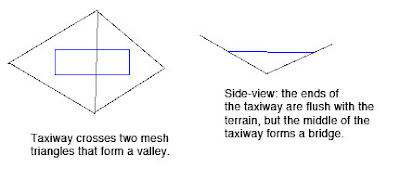
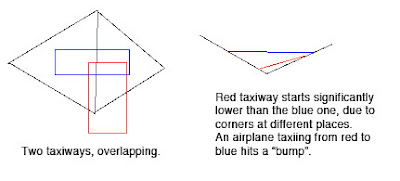
Now the real problem comes when we have two taxiways that overlap. Because they are only aligned to the terrain at their corners and not centers, there may be differences in their height when one taxiway’s corner hits another taxiway’s center (which happens a lot). As the airplane travels from one taxiway to another, the elevation of the ground changes instantly, inducing a major jolt to the suspension. At high speeds these damage the airplane’s suspension.
Bumpy Runways Now
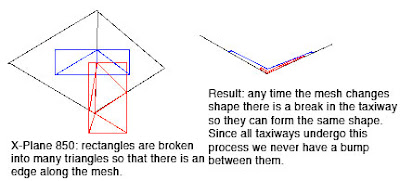
In X-Plane 850, we break all runways and taxiways (new and old) into multiple pieces each tiem the terrain underneath them has an edge. The resulting taxiways are then aligned to the mesh at their corners. But since no taxiway center goes over a mesh corner, the taxiway “hugs” the mesh perfectly. And since all taxiways hug the mesh in the same way, there is never a height gap between taxiways.
It’s the Mesh, Stupid
So why do we still have bumps in X-Plane 850 if we so carefully make sure the taxiways exactly reflect the mesh height? Well, you’re effectively driving on the terrain, so any bumps are ones from the terrain. Simply put, even with the new system the usability of sloped runways is only as good as the underlying terrain.
Now our meshes come from SRTM data, which is radar data – it naturally has a certain level of noise and “speckle” which makes it pretty unusable for airports…airplanes are very sensitive to even small bumps during takeoff.
We attempt to “condition” the elevation data for airport use, smoothing out hills and bumps. Unfortunately our algorithm doesn’t always work right. The X-Plane 8 US scenery was way too bumpy to be usable. The 7-DVD set is better, but still makes bumpy airports in a few cases:
- If there was no airport in the apt.dat file at the time of scenery creation, no conditioning was applied, and the underlying terrain is probably inappropriate for draping.
- The scenery creator has a bug that causes airport flattening to fail when it’s very close to water. For example, the big bump in the runway at KLGA is due to a water-airport interaction.
- I think that flattening across DSF tiles can have problems too.
If you’ve been thinking — wow, the diagram for 850 has a lot more triangles (10 vs 4) than the one for 806, you are right. Fortunately, the number of triangles, all part of one taxiway, in an airport layout, doesn’t really affect frame-rate, since this is handled by the GPU.
But this is also a case where a few curved polygons can be much more efficient than several overlapping ones – when we cut up the taxiway based on the mesh, if there is ovelapping pavement, each overlapping taxiway must be cut, multiplying the effects of the mesh on triangle count.
It also turns out that in the real case this is somewhat moot: because X-Plane smooths the airports and then induces triangle borders around the edge of the airport. Since the interior area is so flat, it doesn’t require a lot of triangles, and therefore the trianglse inside an airport tend to be big, so the number of times we have to cut an actual layout is quite small.
It looks so innocent, that one check box…”draw hi detailed world”. What harm could it do?
Well, if you have a GeForce FX graphics card, quite a bit! If you have Vista it may not be a great idea either.
The “draw hi-detail world” setting turns on multiple rendering settings that look nice but hurts fps. There are two I can think of right now:
- With the setting on, we draw 3-d structures for airport lights. This can slow down slower machines, but usually isn’t the big problem.
- With this setting on, we use pixel shaders to draw terrain – without it we use the traditional “fixed function” OpenGL pipeline.
It’s this second behavior that causes all the misery. X-Plane won’t use pixel shaders if your video card doesn’t have them. But…what if your card has pixel shaders and they’re just not very good?
I should say: I have no first-hand knowledge of how the GeForce FX series works, and what I am repeating is simply conjecture posted on the web, albeit conjecture that explains what we keep hearing from users. The GeForce FX (nVidia’s first series of programmable pixel-shader based cards) is a hybrid card – half the card’s transistors are dedicated to fixed-function drawing, and only half for shaders. Thus if we go into shader mode, we basically “lose” half the chip, and our performance tanks. (ATI built 100% programmable cards starting with their first entry, the 9700, and nVidia went this way with the 6000 series.)
So if you have an FX card, it tells X-Plane “I can do shaders”. With “hi-detailed world” on, we take a huge performance hit. Simple solution for FX users: turn “hi-detailed world” off! Get your fps back!
I’ve also heard a bunch of reports that the new drivers for Vista have bugs…they seem to come out more when we use pixel shaders . Again – turn “hi detailed world” off and see if it helps!
Bottom line: “draw hi detailed world” is proving to be an aggressive setting – I recommend backing it down as the first step in trouble-shooting performance problems.
With X-Plane 860 there are two ways to draw stuff on the ground:
- Use an OBJ and ATTR_poly_os. This is the way most people have built custom taxiways, markings, etc.
- Use a DSF overlay with a bezier polygon (which is controlled by a .pol or .lin file).
Which should you do? Hrm…
- For any geometry that goes over a very large area, the DSF overlay with a bezier polygon is basically a requirement, because the polygon will “drape” over the ground. The OBJ might just stick out in the air.
- If your element repeats a lot, the OBJ may save memory. (OBJs are stored in memory once and used many times – bezier polygons use RAM each time they’re used.)
- If the overlay is very simple, the DSF overlay may perform better.
- It may be too expensive to build complex lines with DSF overlay lines. They’re meant for taxi-lines, not full vector graphics!
So here are a few decisions I’d make:
- Taxi lines – certainly DSF overlays if we’re not using apt.dat 850.
- Parking spot at an airport – use one large polygon with a texture, not a bunch of bezier lines.
- Use a DSF overlay for that parking spot, even if we use it 60 or 100 times. The simplicity of the overlay (vs. the compexity of starting and stopping an OBJ from drawing) outweighs the cost of using it many times.
- A very structurally complex overlay on the ground with thousands of triangles (that for some reason cannot be created with a texture) that is used a lot — well, this is an “artificial” case I’ve made up, but in this case use an OBJ.



