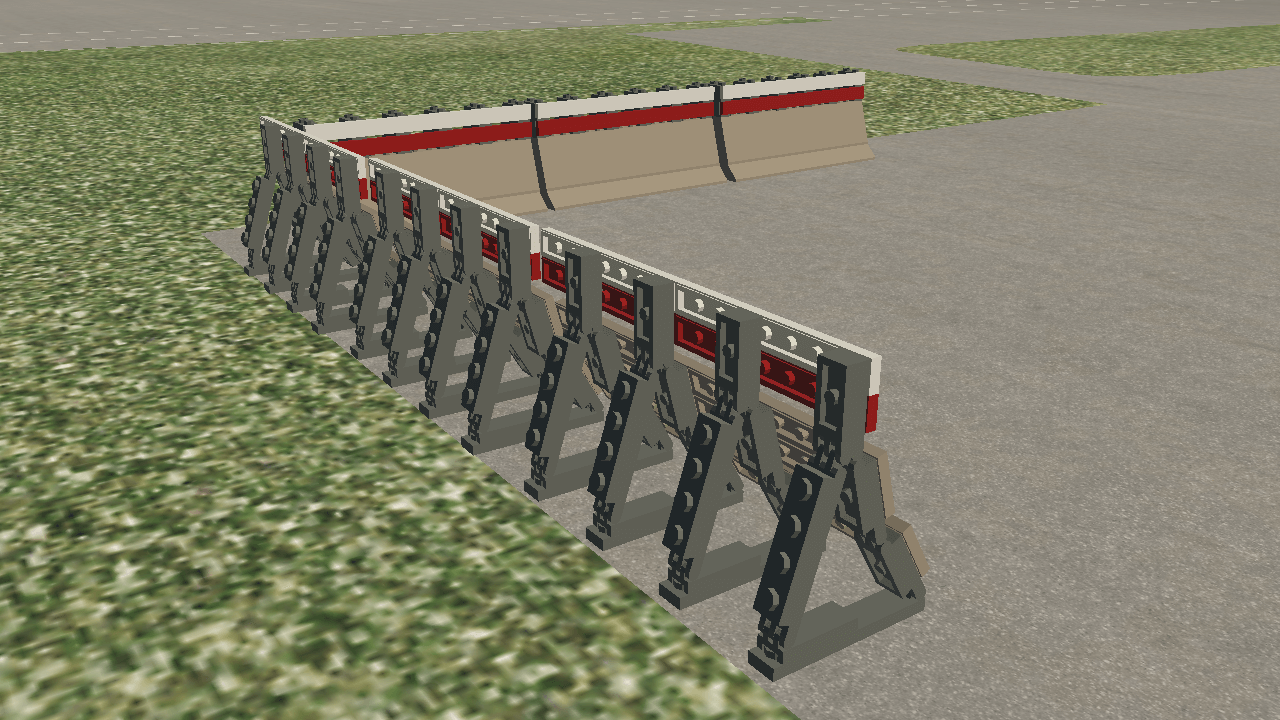
X-Plane 11 has had several fantastic updates to the library of lego-brick airport objects that ship with X-Plane. We’ve had new European-style objects, elements for small airports, and the terminal and jetway kits let you build really great looking airports that fit the exact shape of the real-world airport you are modeling.
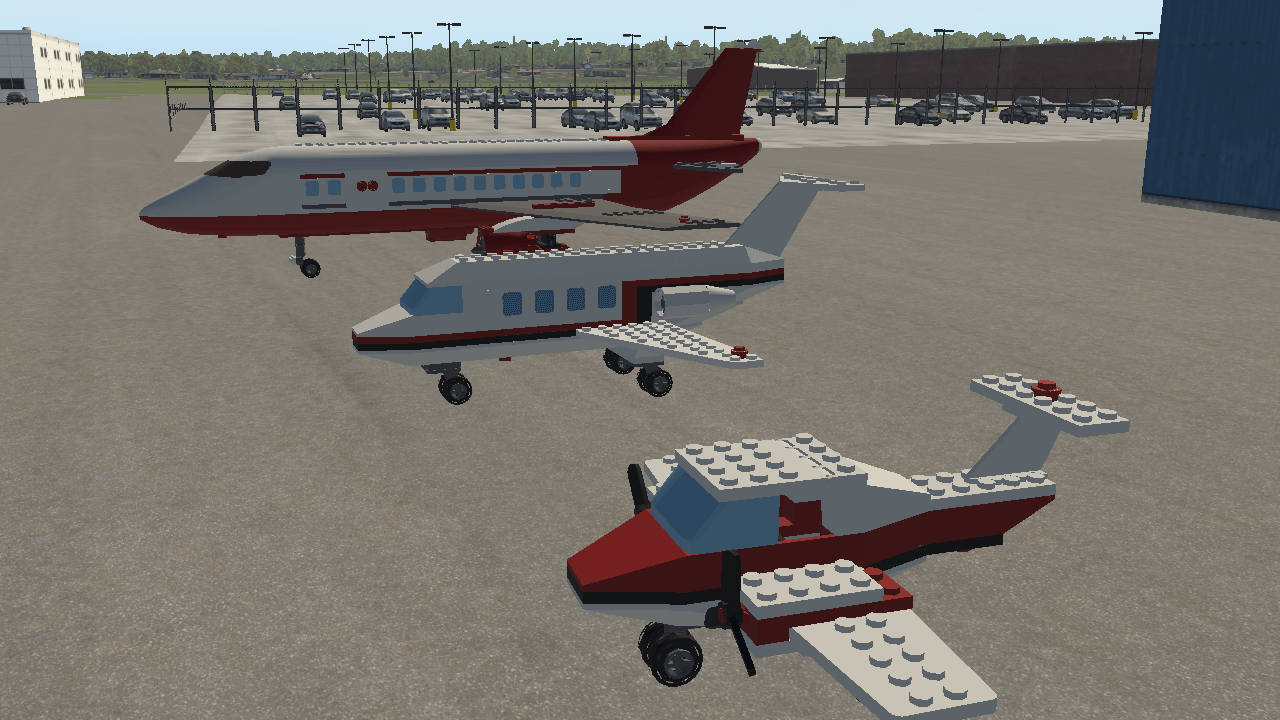
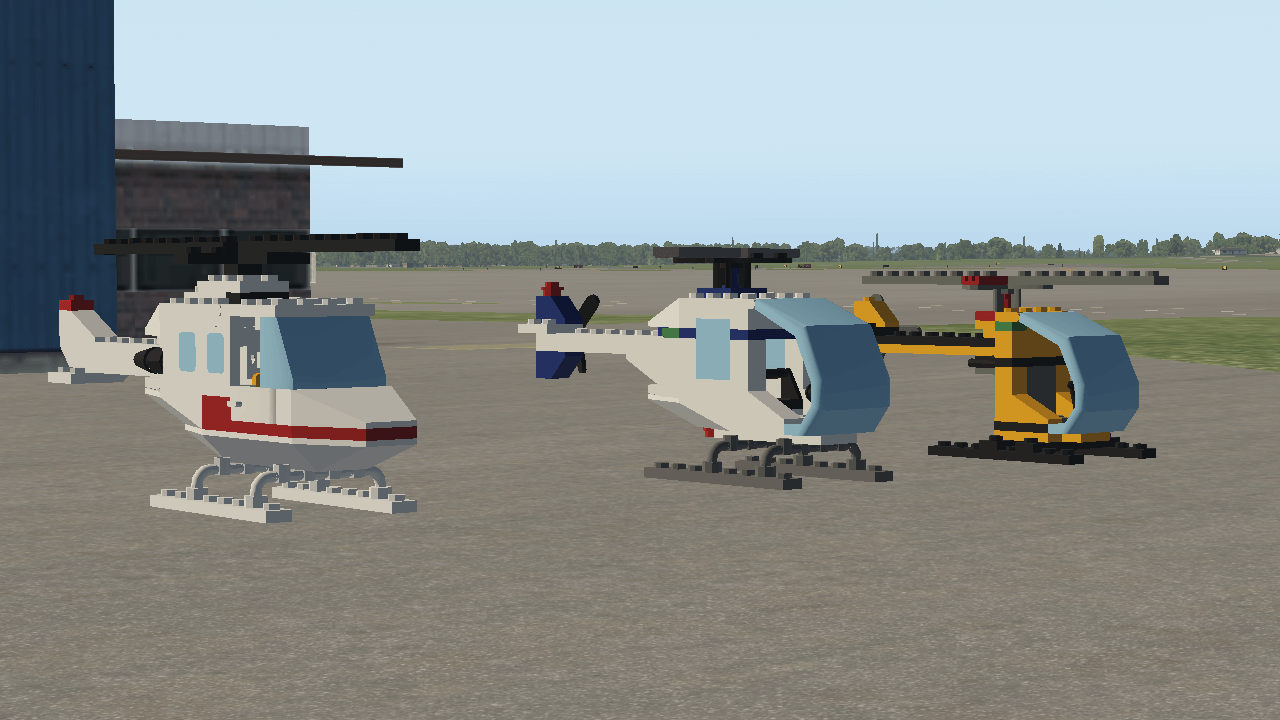
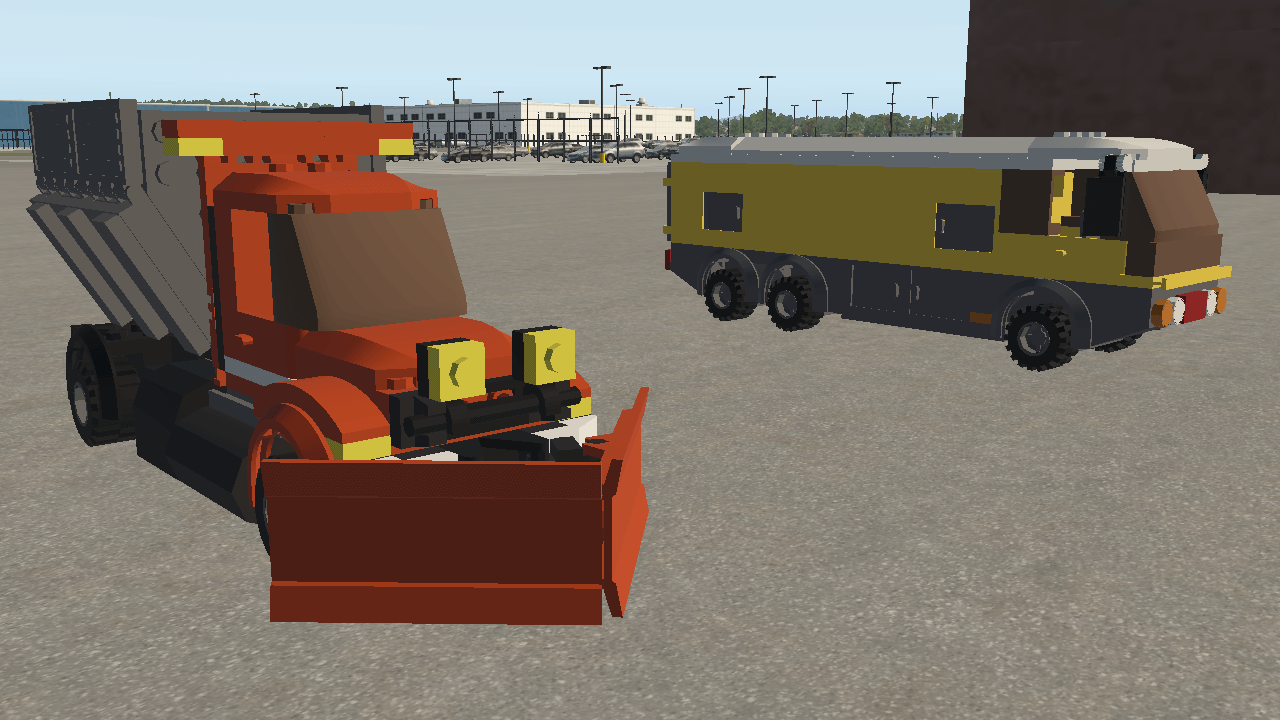
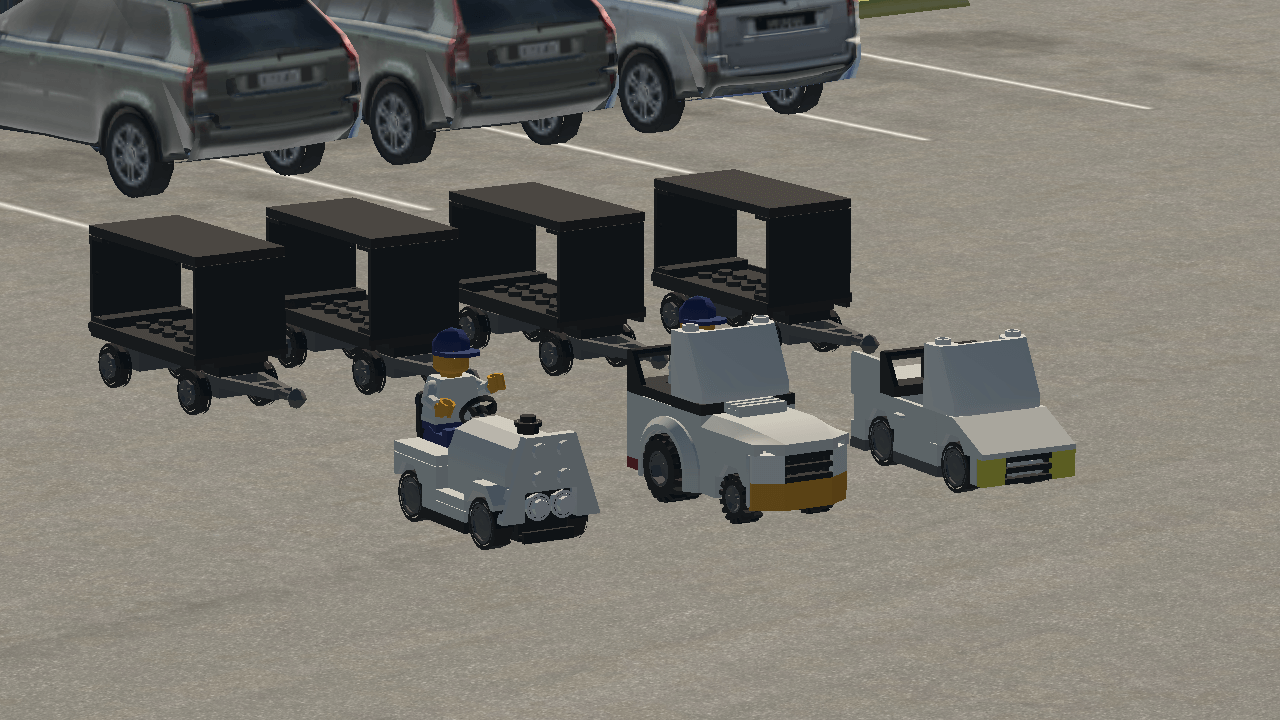
In that context, I’m pleased to show you a sneak preview of the next set of lego-brick objects for gateway airport authors.
New Static Airplanes
New Static Helicopters
Emergency Vehicles
Luggage Tugs
Jet Blast Screens
You can download a preview if the new lego bricks here.
Release notes detail the bug fixes here. We have another set of bug fixes that will go into beta 4 next week.
We’ve received a number of bug reports from plugin developers trying to use the new plugin APIs. We’ll have another beta next week to address the rest of the open issues, including the ability to (finally) use widget-based UI in VR.
Beta 3 fixes the MFD brightness going crazy in the G1000 C172, and fixes shadow casting on transparent-alpha-textured objects, but we still have an open bug with panel brightness in a Carenado aircraft that looks like a low level rendering bug. 11.20 has a lot of change to the rendering engine to support VR, performance and our migration to Vulkan and Metal, so authors: please be on the lookout for changes to how your models render compared to X-Plane 11.11.
If beta 3 isn’t found to be a smoldering wreckage of poorly thought out C++ over the next day, we’ll post a Steam version of the beta.
It’s like beta 1, but without the missing art asset. 🙂
We’re working on beta 3 now, which will have some fixes for rendering bugs. A few notes:
This is not going to be a typical eight-week beta. Please go check your add-ons this week.
The biggest area of code change for VR that affected other parts of X-Plane was the rendering engine. I’ve fixed 3 rendering bugs where I broke something while restructuring the renderer for VR, and none were surprising. Please check your aircraft or scenery pack for visual defects and let us know!
X-Plane 11.20 VR preview 6 is out, and if preview’s 2 and 4 are any predictor, it’s going to be a dreadful disaster, as all of the even number previews have been so far.
But maybe not! Maybe we can break the curse – after all, Star Trek did it with Nemesis. Anyway, VR6 is available for public beta. Steam users – we’ll post it on Steam tomorrow if we haven’t found a major problem, otherwise we’ll go right to 7.
Highlights:
Asynchronous Space Warp (ASW) works for the Oculus Rift.
No more white instruments.
No more crashes loading some third party aircraft.
The xPad won’t follow you around as you teleport around the tarmac.
Depending on how things go, this might be the last VR preview! ASW and xPad teleportation were the last two big VR specific issues; if things go well, we’ll produce a general 11.20 beta for everyone with the other features mixed in. I’ll post about that next week if VR6 doesn’t have to be recalled for insubordination.
Fellow nerds^H^H^H^Htrekkies^H^H^H^H^Hnerds are aware of the even-odd phenomenon – for nine films, every other Star Trek movie was pretty bad, then the next one would be okay. VR previews are now like that, with VR2 and VR4 being fatally broken. We’re planning to just skip 6 entirely.
Anyway, I broke VR4 – my code to put a loading screen in the Oculus Rift had a side effect of killing the render resolution on the HTC Vive and WMR-based headsets. Since I only have the Rift (Chris has one of everything) I never saw the bug; since I thought my change wouldn’t affect anything outside the Rift, Chris didn’t re-try the Vive.
So, VR5 is now up – this should restore the Vive/WMR headsets to the performance of VR3.
We can confirm that ASW is not working in VR4 or VR5 – we’re looking at this now, but for VR4 and VR5 you’ll see ATW but not ASW, regardless of Oculus debug settings.
(Edit: the first version of this post confirmed no ASW in VR5. ASW is off in both VR4 and VR5 because the native rift SDK is not permitting ASW for X-Plane. A number of commenters were concerned that they would lose ASW by going from VR4 to VR5. You will not! ASW is already off in VR4; if you like VR4’s performance, you clearly don’t miss ASW.)
(Edit 2: We have a very promising lead on the ASW issue for Oculus. We have it working again here but I want to do more testing before I declare victory. We do not need any more information. Nothing you can do on your end will fix this. If you think you’re fixing it by “jiggling the handle” you’re probably just falling into placebo effect. If everything goes well we will have an update to fix this over the next day or so).
We’re starting internal and private testing of VR preview 4 – if it goes well, we’ll release it early next week. A few notes on usability:
Have Your Mouse Cake and Eat It
We got a metric ton of “bug reports” that users couldn’t click “Disable VR” when using the 3-d mouse. I put bug reports in air quotes because disabling click zones on the main monitor when using the 3-d mouse was totally intentional! (In other words, I broke that button on purpose.) My thinking was that you might click on “Disable VR” by accident while in the headset because you don’t know what the 2-d mouse is hovering over while clicking.
In VR4, we have a solution to the problem of whether the 2-d or 3-d mouse is the “intended” cursor when a click happens: we read the headset’s “on the user’s head” sensor and disable the 3-d mouse (temporarily) when you take the headset off. So you can be clicking in 3-d, take off the headset and immediately click “Disable VR” and we figure it out. This feature is great for developers who need quick access to 2-d debug tools like the texture browser or DataRef editor. Read More
It’s basically VR2 with the crashes and chaos fixed. The plugin system in VR2 had a bug that seems to have caused plugins to go completely crazy and cause weird rendering settings changes. This should be fixed in VR3, but check your settings to make sure they match what you expect.
VR3 also fixes the sim not starting on older Linux installations.
EDIT: VR3 is now available as a Steam public beta too.
We’ve seen a few critical bug reports over the weekend, so:
We’re going to hold off on the Steam release of VR2.
VR3 should be out really soon – basically as soon as we can get these critical bugs fixed. We’ll put that on Steam.
Some notes:
VR2 won’t launch on some versions of Linux due to a plugin DLL problem. We don’t have a fix for that; we have to fix the sim.
The HOTAS Warthog causes the sim to crash if it’s plugged in. We’re fixing it.
If you have any other hardware that either won’t calibrate or crashes the sim, please dofile a bug!Commenting on the blog does not count! If you’ve commented on the blog, even if LR staff has replied, file a bug. Only bugs go somewhere that get tracked.
We’ve seen reports of plugins crashing that did not crash in VR1. If a plugin is now crashing in VR2 that didn’t crash in VR1, please report it! It’s useful to know whether the plugin crashes in VR2 even if VR is not being used.
Anyway, we’ll try to stabilize this stuff in VR3, then move on to more investigations WRT Oculus performance, and fixing other VR bugs like xPads floating in the air.
Plugin developers: the title says it all – don’t register a drawing callback that doesn’t actually draw anything.
When I write it like that, it sounds a little bit silly, but some plugins register a drawing callback on startup, because they might draw something – but then only do the drawing when certain things happen. I am guilty of this myself – libxplanemp registers its drawing callbacks at init time even if there are no multiplayer planes to draw.
Most plugins did this for simplicity and to avoid any strange rules about when you could register things – the original 1.0 SDK was a lot pickier than what we have now. And back in 1537 when the French invaded Flanders, the cost of a no-op a draw callback was pretty cheap – just the cost of the function call-out and a few instructions of book keeping.
Over time, as X-Plane’s renderer has become more complex, this has become not the case. X-Plane now does some significant work to save and restore GL state when we hit a drawing callback, and that overhead is going to become significantly more expensive when we move to Vulkan/Metal.
To optimize this, Tyler modified the drawing callback code in 11.10 – starting with 11.10 if we find that no plugin has registered a given drawing callback, we skip the entire process, including the OpenGL book keeping.
So if your plugin goes in and registers a callback for every single drawing callback type then we have to fall back to the slow path, carefully stashing our GL state and prepping for your running at each drawing callback point.
Here’s my guidance:
Never register for a drawing callback you’re not going to use.
Do delay registering for a drawing callback until it is possible to need it.
Don’t try to optimize your drawing callbacks by registering and de-registering per frame.
So as an example, it would be reasonable for a multiplayer API to register a drawing callback when the first airplane enters the system and then keep it around until the last airplane goes away, even if that airplane is off screen.
(The reason for that last rule is: if we have to make an expensive graphics transition once we discover that drawing callbacks will be needed, we don’t want to get thrashed by drawing callbacks disappearing and then re-appearing over and over.)
I don’t think there’s been a subject that has attracted as much attention on the developer blog as VR – 274 comments on the announcement and another 90 on the next VR topic. We’ve also received tons of bug reports, emails, and Chris has even sat down and watched endless video commentary on Youtube about our VR preview. (Just a reminder, this is a PREVIEW, not a Beta. In a Beta, we expect the features to be mostly complete, though perhaps with some bugs. In this preview, we’re still actively working on the features!)
A lot of the discussion has been about how you interact with the virtual world; Chris and I have spent literally hours discussing this since VR1. In this post, I want to share our thinking and what we’re working on for VR2.
We can view VR interaction in terms of four use cases: fully virtual, virtual with touch and hardware, no touch controllers, and HOTAS. Let’s look at them in detail.
Fully Virtual
The case that works best in VR1 is a “fully virtual” work-flow – take two touch controllers and sit in your room and you can operate the entire aircraft. There are some rough edges that we are looking at.
Lots of users complained that the yoke movement in VR is always a joystick motion (rotation controls pitch and roll), even if the aircraft has a yoke you pull toward you to climb. Chris’s always-a-joystick choice was based on ergonomics: since it’s fully based on angle, you can move your hand to rest on something while flying without changing your pitch. This reduces the fatigue that would come with having to hover your hand over the exact position if you were using the yoke in a realistic way. With that said, we’re looking at providing both a “realistic” mode (where motion tracks the virtual yoke, matching our other manipulators) and an “ergonomic” mode, where the control is always a joystick and you can fly from any virtual hand position.
There’s no way to input rudder right now if you don’t own physical pedals. Tyler is working on making the touch controllers configurable as joystick devices. With this, you can map rudder onto your joystick or D-pad, and also use some of those buttons for common functions. (This capability is useful for two-controller use cases; users with one controller and physical hardware will probably want to keep most of the VR controller buttons mapped to VR-specific functions, as some of these cannot be moved to a conventional joystick.)
Controllers and Hardware
We heard about this case in the private beta: users with touch controllers and physical hardware have a problem when the virtual control is located inside the physical control in the real world. This happens if you are flying the Cessna and have a CH Products Yoke, for example.
To solve this, we’re adding the ability to “touch” cockpit elements from a distance via the controller lasers. It’s a little harder to use than grabbing the controls directly (because small wrist motions are amplified by distance) but it lets you get at controls that would otherwise be blocked.
Laser grabbing also turns out to be really handy for airliners – the gear handle is a stretch from the captain’s chair in the 737; now you can grab it by laser.
Laser grabbing should work seamlessly with conventional direct manipulation of controls, so for users who are happy with the direct interaction in the default fleet, there should be no loss here, and no need to revert to a mouse because some of the controls are physically blocked.
Mouse Control to Major Tom
Some users don’t have touch controllers, just an HMD, a mouse and real flight hardware (E.g. a USB yoke or something). For these users, we’re working on 3-d mouse interaction with the sim. I am not sure how capable it will be, but if you used to fly with a monitor, stick, and mouse, now you can fly with an HMD, stick, and mouse; anything you would have done with the mouse before (UI clicking, 3-d cockpit interaction) stays on the mouse.
HOTAS
Some users fly with only physical hardware (E.g. a Warthog or some other HOTAS setup). This is the group of users that Chris and I are, frankly, kind of perplexed by. If you flew X-Plane HOTAS before VR, X-Plane is, right now, just as capable in VR; anything mapped to your USB hardware still works on your USB hardware, and if you have to go pick up a touch controller, you would have had to pick up the mouse anyway. Once we have mouse support, the mouse can be “the thing you get for UI” instead of the touch controller.
We are looking at HMD-mounted UI selection, e.g. look at the UI and click a button – Rift users may be familiar with this from the “look at this warning message for 2 seconds” notice at startup.
My personal opinion here is: having used half-written mouse code, touch controllers and HMD-aimed selection, personally I thought HMD-aimed selection was not only the worst of the three ways to interact, but it was not in the same league as mouse or controllers in terms of precision. But it does provide a way (not possible right now without VR) to stay HOTAS for the entire use of X-Plane, which could be valuable.
When
I’m not sure how soon we’ll cut VR preview 2 – I wanted to get it done this week, but I think it’s going to be some time next week; we’re working on these issues now, but it’s hard to say when it’s “done” – we might try all of our “really good ideas” and realize they need more work. That’s how user-interface is…you have to try it to know whether the idea works.