World Editor 2.6r1 is available!

World Editor 2.6r1 is now available. This is the first release candidate, for which we encourage you to explore before we lock it down for release! Version 2.6 packs quite an extensive feature list.
Read More
World Editor 2.6r1 is now available. This is the first release candidate, for which we encourage you to explore before we lock it down for release! Version 2.6 packs quite an extensive feature list.
Read MoreX-Plane 12.1.1 is out! This is a quick “bug fix” patch on X-Plane 12.1.0. If you could not load the sim due to problems with XPLM_64.dll, please update using the installer to fix it. Full notes here.
Besides fixing bugs, X-Plane 12.1.1 enables X-Plane’s web API*. Basically we were asked for this so many times at FSExpo that Chris and Daniela put the remaining work on the fast track.
Our plan is to build several services into the web server; the web APIs will not be exact mirrors of the plugin SDK, but will cover enough functionality to build wide range of apps. We have plans for:
Documentation on the new web APIs can be found here.
X-Plane alum and fellow X-Plane-10-survivor Tom Kyler is back working on developer documentation for us, and has finished a first release on some of the new X-Plane 12.1.0 features:
Tom has big plans for X-Plane’s documentation; one thing that’s great to see in these docs is really good illustrations based on real sample 3-d models and test projects.
A detail texture is a repeating, high detail pattern that adds high-res detail to an otherwise lower resolution texture. Detail textures let us add fine detail at high resolution without using a ton of extra VRAM efficiently. We use detail textures with bits of “gravel” to make the runways look more realistic.

We introduced detail textures over a decade ago in X-Plane 10 to enhance ground detail around airports and in the new (at the time) autogen cities.
What we did not do was give them a good name. At the time we called them “decal” textures. This has turned out to be incredibly confusing, because in every other game engine ever, a high-res texture applied over the entire material (which is what we have) is called a detail, and a decal basically means “sticker that you stick on somewhere”. Detail textures make the ground look more rocky, decals add blood spatter and bullet holes to the walls in your zombie-shooter game.
So moving forward, we are going to try to call detail textures “detail textures” wherever possible, to be consistent with the norms of content creation. Tom and Maya will be updating labels in Blender and doc to be consistent about this.
For X-Plane 12.1.1, Maya has extended the detailing system in two ways:
You can get the 4.3.3 beta XPlane2Blender plugin here to use the new detail textures. Maya is planning on a release Real Soon Now™.
* Please note that while the dataref API does use websockets, most of our web APIs are conventional REST requests over HTTP. I did consider “The X-Plane developers never REST..until now” as a section title.
The X-Plane 12.1 release candidate is out today!* The last twenty four hours have been a mad dash to get the release candidate posted before we head to Las Vegas for FlightSimExpo 2024. If you are attending, stop by the X-Plane booth – there will be a bunch of us there including myself, Austin, and Marco, our new release manager.
All of this is a little bit exciting because we can’t recut the release candidate while in Las Vegas – one of the machines involved still requires a human to sit in front of it. We’ve been racing to get the RC done while we still have access to those machines, and the build system responded as you’d expect – by failing in all sorts of new ways. My plan is to just not breathe until I’m on the plane tomorrow.
(*) Because this is a release candidate you still have to check “get betas” in the installer to opt in to getting the RC; once the candidate has been out for a week, if nothing huge goes wrong, we will declare it final and it will become the official update for everyone.
In my previous post I drew an analogy between a scenery system with its file formats and a turtle within its shell. We are limited by DSF, so we are making a new file format for base meshes so we and all add-on developers can expand the scope of our data and make better scenery for X-Plane.
The really big change we are making to base meshes is to go from a vector-centric to a raster-centric format. Let’s break that down and define what that means.
Vectors are fancy computer-graphics talk for lines defined by their mathematical end-points. (Pro tip: if you want to be a graphics expert, you just need the right big words. Try putting the word anisotropic in front of everything, people will think you just came from SIGGRAPH!) DSF started as an entirely-vector format:
This isn’t the only thing DSF does – we added raster capabilities and there is e.g. raster sound and season data in X-Plane 12, but DSF is fundamentally about vector data – saying where the edges of things go exactly.
This was great for a while, but now that we have more and more vector data (complex coastlines, complex road grids, complex building footprints) the DSFs are getting too big and slow for X-Plane.
Raster data is any data stored in a 2-d grid. This includes images (which in turn includes orthophotos) but it also includes 2-d height maps (DEMs), and the 2-d raster data we include in DSF now (e.g. sound raster data, season raster data etc). Any time we store numbers that mean something in a 2-d array, we have raster data.
Raster data has several advantages over vectors:
Twenty years ago, when I first worked on DSF, computers didn’t have the capacity to use lots of raster data – this was back when 8 MB of VRAM was “a lot”. But now we no longer need to depend on vectors for space savings.
Raster tiles are raster data broken into smaller tiles that get pieced together. Raster tiles have become the standard way to view GIS data – if you’ve used Apple Maps or Google Earth or OpenStreetMap or any of the map layers in WED, you’ve used raster tiles.
Raster tiles have a bunch of advantages too:
So our plan for the next-generation base mesh is “all raster tiles, all the time” – we’d like to have elevation data, land/water data, vegetation location data, as well as material colors all in raster tile form. This would get us much better LOD/streaming characteristics but also provide a very simple way for custom scenery packs to override specific parts of the mesh at variable resolution with full control.
Raster tiles are not the same thing as orthophotos. A raster tile is any data contained in a 2-d array, not just image data cut into squares (e.g. orthophotos). So while a raster-tile system may make it easier to build orthophoto scenery, it does not mean that the scenery can only be orthophotos.
Thomson and Dellanie posted a preview of what’s coming in X-Plane 12.1 – click over to the news blog to see the pretty pictures. Short story long, it’s a graphics-intensive release, but it’s also a big release, with weather, systems, avionics and ATC updates too. What follows here is a few details for developers.
As with all past X-plane 12 patches, we are planning to do a private “alpha build” test run with the developer lobby before public beta. We do this both to find out about add-on compatibility and to get the worst bugs fixed with a smaller test group. As of this writing, ATC is at the end of bug fixes, the last graphics changes are being tested, but my weather work is still mid-development.
This release turned out to have a lot for scenery developers:
The entire DECAL system (existing and new normal map decals) are also usable in OBJs for aircraft as well, and the particle system has received some upgrades that can be used everywhere.
One warning: the old “smoke puff” directive for OBJs from X-Plane 8 is now inoperative; with 12.1.0 we finally removed the old particle system completely. I suggest using the new particle system as it will give you real control over what kind of smoke comes out of your models.
Two new plugin APIs are planned for 12.1.0:
We are still putting finishing touches on the avionics APIs now, but this tech is very close to complete, and definitely usable.
Unfortunately we will not have a low level weather API in 12.1.0 – R&D on this is ongoing, but at least in better shape than it was before due to fixes to the internal weather code.
After the X-Plane Developer Conference in Montreal this weekend (thanks to everyone who came and especially ToLiss for hosting/making us feel totally at home in Montreal) I thought “I should probably post something to the dev blog talking about what we’re up to.” I logged in and saw…I haven’t posted anything in four months.
So that’s not great. The truth is the X-Plane team is larger than it was in the v10 days and I spend most of my communications time talking to the internal team and third party developers.
I’m going to try to post once a week here. This sentence may be an embarrassing monument to lofty but impractical goals in another four months, but putting it in writing is a way to commit to it, and it won’t be the most embarrassing thing I’ve ever done.
We announced the X-Plane Store plan in Montreal; Dellanie’s got a great FAQ there, but here for developers I just want to make two points clear:
We have two “big updates” planned right now:
Both releases will have a bunch of other stuff too; they’re big patches. I’m pointing to the graphics/FM divide because the decision to push one of graphics or physics in each patch is intentional to keep the scope of the beta under control.
We are aiming to get 12.1.0 into private testing this month.
Probably only three people on Earth care about this, but after a decade (more walk of shame) I was trolled into updating the .net file format specification. So if this is interest to you, I apologize both for the delay and for the pain you are about to suffer. The road art file format in X-Plane is incredibly complicated and I don’t actually recommend anyone try to hack it, but it’s also not meant to be a secret.
I am working to get water and orthophotos sorted out, hopefully for 12.1.0. We will also have a DSF recut (hopefully for 12.1.0 but maybe for 12.2.0) to address gateway airport boundaries and runway undulations.
In Montreal I discussed a little bit about the future of the X-Plane scenery system, but that’s complex enough to warrant another blog post.
Editor’s note: what follows is very, very, very, very, very silly.
Last week we shipped X-Plane 12.06; since then we have found a few straggler bugs; like typical lARRge patches from the days of X-Plane 11, a few bugs escaped us until after final, including some crashes we could see in the auto reportARR.
While it’s not great to be shipping a “hot patch” to our release, it is pretty fantastic to announce X-Plane 12.07 ARRsea 1 on International Talk Like a Pirate Day (the 19th of septembARR). The rest of this blog post only gets worse; you’ve been wARRned.
Internally, nobody is happy about this, but the hot patch bumped all of our version numbers. So the new road map looks something like this:
12.08 (né 12.07) is almost completely integrated and should be ready for private testing as soon as 12.07 is settled.
Since 12.07 is a new version, you won’t be auto-updated to upgrade from 12.06 while 12.07 is in testing; run the installer, update with “get betas” checked and you can get 12.07.
12.06 shipped with more sensitive internal detection for numeric problems. This is how we run the sim internally all the time – the goal is to find and squash bugs fast.
Unfortuntately there are sections of X-Plane’s simulation that are:
As it turns out, these systems are often happily running away in the background producing absolutely bonkers values; with sensitive numeric checking, the sim can crash due to problems in a system that nobody cares about.
For 12.07, I solved the problem by muting the alarm. My expectation is that we’ll have sensitive numerics in most betas, turn them off in the releases, and work through the systems code over time. (The priority on this isn’t super high because the systems aren’t consuming framerate – if they were we’d see them in our profiling.)
The other area where we saw increased crashes was with TCAS plugins. 12.07r1 has better logging and shouldn’t crash as much – the goal here is to not brick third party add-ons.
Multi-monitorARR: data output was not working in full screen configurations, fixed now, and manipulators work for multi-monitor systems.
OpenXARR: HP Reverb fixed, and we finally figured out why the white board would sometimes disappear. (It wasn’t gone, it was just 20 km from the hangARR.)
X-Plane does not have a built-in way to remove the bezels from the pop-out avionics. To solve this, some of our user and some add-ons edit the ARRtwork inside X-Plane’s “resources” folder, setting the bezels to clear.
X-Plane 12.06 introduced new bezel variants for the G1000 to cover all of the real-world panel button configurations. This fixed the bug “the real aircraft does not have these buttons, but when you pop the panel out, the buttons appear and do nothing.”
A side effect of this is: those aircraft using the new bezels use new art files, so the hacked up no-bezel art files on longer work.
This is not a bug for us to fix; if your add-on works by modifying the internals of X-Plane, we cannot guarantee that it will keep working even when we change the sim. (The only way to make that work would be to never change the sim.) You can work around this by modifying the new bezel files.
In the future, our plan for this is to provide a real way to hide bezels in the sim as a built-in part of the UI, which should make hacking unnecessary.
Hopefully 12.07r1 will be “one and done”; if so, we’ll move on to private testing of 12.08 almost immediately.
If you are a third pARRty and your add-on has problems with 12.06, please tell us four weeks agoas soon as possible!
A few quick notes on 12.06-related chaos – it’s been a weekend.
“Don’t rock the boat in a release candidate.” This is the lesson I should know, since I have cut at least 187 of them.
In 12.06rc1, we were missing HEKA (completely) and all of the airports at KLAS; the KLAS problem was due to a missing art asset. One of the multiple confounding factors in this bug is that the global airports don’t put up a “there was a problem with the scenery pack” pop-up message when art is missing. So, being the brainiac I am, I went “oh, that seems dumb, we’ll never know if the pack has problems, I’ll go fix that now”.
For 12.06rc2, I changed the policy so that the global airports would get a pop-up message like any other scenery pack that’s missing art.
As it turns out, the global airports are missing lots of objects – and probably have been for the entire X-Plane 12.0 run.
So coming soon to an installer you: X-Plane 12.06r3, which will be just like r2, but with the pop-up message turned off (just like the rest of the beta has been).
We have a more comprehensive plan to address these art asset issues for 12.07 – I’ll comment on why it’s important that missing scenery assets be errors in another post.
As a side note, it appears the most RCs we’ve had is X-Plane 9.40, which got up to release candidate 16 and took at least six weeks.
In X-Plane 12.06r2 we have disabled Zink for NVidia users. We did this because there is an NVidia driver bug that interacts with Zink that will cause the sim to crash.
NVidia found the bug, is working on a fix, and they are quite responsive in pushing driver fixes. As soon as the fix is in non-beta drivers, we will change this from a “zink is banned” to a “you must have at least driver version x.y to run zink” message.
If you really really really want to run Zink on your NVidia card, you can still can, using these two steps:
--zinkAMD users: you are not affected by this, so Zink is still available. Enjoy this rare chance to make fun of your green team compatriots.
Over the weekend the real weather servers went down. While we usually blame NOAA for this kind of thing, this one was super embarrassing: the server ran out of disk space (and the disk space monitor didn’t notify our ops team). The ultimate cause, I suspect, was that it was labor day weekend in the US, e.g. “a really good weekend for infrastructure issues.”
This isn’t the first real weather outage we’ve had this year, and for this reason we have a replacement weather server in development. The replacement will be able to serve the least old weather correctly when NOAA has a maintenance outage (instead of just 404ing everyone) and will hopefully clean its cache out correctly.
(The caching problem is slightly harder than it sounds: we do want to retain some old real weather files for test cases and bug reproduction. But we need to purge most of it to keep the server from filling up.)
If 12.06 rc3 is final, we’ll let it sit a little bit and then start private testing of X-Plane 12.07. The X-Plane 1.206 beta has taken quite a bit longer than we wanted, so 12.07 is intentionally a smaller release – about half the size in terms of code change. That’s still a lot of new stuff (and a topic for yet another separate blog post).
If 12.06rc3 is not final, I will set myself on fire.
Jim Keir here – today I’m going to talk about what’s been going on with ATC for the last six months or so, and what’s planned for the near future.
You’d be forgiven for thinking that the answer to the first is “not much”, simply because there’s been very little visible in the release notes for ATC, but that’s definitely not the case. Normal work on bugs and small improvements has been going on as usual, and 12.06 contained quite a backlog of these which I’ll go into more detail about below. Normal progress has been slowed, however, by time spent on adding one huge new feature. More on that later.
First though, a quick peek behind the curtain. This is a very high-level list of the changes that went into 12.06, now with added explanations! I’ve removed about half of it because they were maintenance, corrections to previous changes and other non-visible things, and edited some of the rest to protect the idiot innocent. Many of these changes, especially the ones starting with “Merge branch”, would be made up of many changes themselves and could cover days to weeks of work; others might be a change to a single letter.
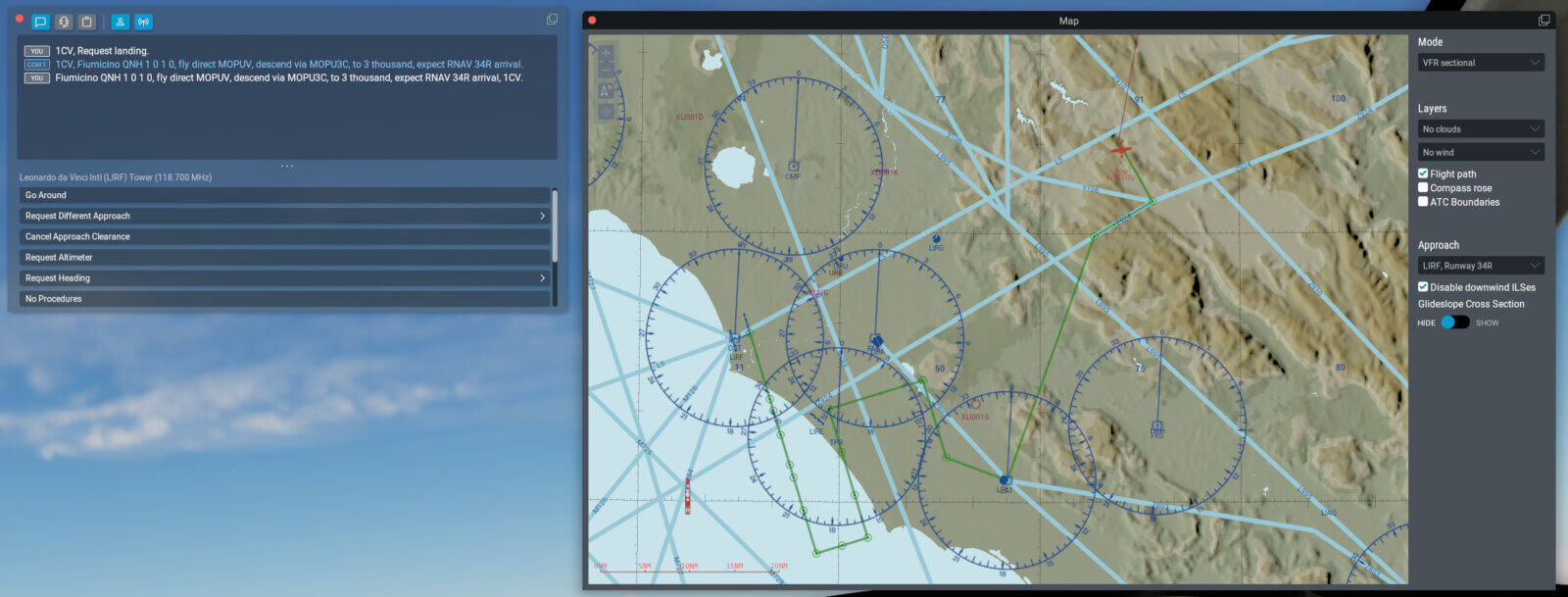
Now for the big change – ‘feat_XPD-12784_multi_channel_atc’. This one’s been queued for quite a long time. Until now, radio frequency use was handled very simply. All controllers would both transmit and receive on all of their allocated frequencies at the same time, and you’d always be told to use the lowest frequency in their list. For small airport towers they probably only have one frequency, but for approach and regional controllers they may have more than one. In fact, some especially large controllers have dozens.
Also previously (i.e. X-Plane 11), everyone being on the same frequency really didn’t matter. AI was used less, ATC was definitely used less, and also had a lot less to say. In X-Plane 12, though, that’s changed. If you’re using both AI and ATC you’ve almost certainly found that near larger airports or even just flying cross-country legs with a controller covering a large area, you just can’t get a word in edgeways. This leads to missed turns, inability to make time-sensitive requests, avoidable go-arounds and other assorted havoc – and that was with human radio time prioritised over the AI.
It was even worse for the AI because they are totally dependent on ATC instructions, so even short delays can put them into a situation where they suddenly need a burst of revector instructions – which increase radio load further. You can see where this is going.
With this change, a controller will actively manage frequency allocation. Instead of everyone always transmitting on a single frequency and the control facility simul-casting on all frequencies, aircraft will be allocated to other frequencies based on both anticipated and actual load. This means that, while you might still end up waiting for a burst of radio traffic to go away, you should be able to speak without too much of a delay. You might also, of course, be asked to change to a different frequency yourself (or, in betas 1 and 2, continually given this call… my bad, fixed for b3).
To be clear, this isn’t a full model of controller sectors, we just don’t have that data available. If you think of it as ‘sectors-lite’, where there are aircraft around you which are being directed by the same control facility but different staff within that facility on different frequencies, you won’t be far wrong. The short version, I hope, is that one of the key frustrations with the ATC system, a valid frustration which I saw people saying simply stopped them using ATC at all, should be gone.
And for the future? Normally of course we don’t go into too much detail about what’s planned unless it’s a hot topic, simply because shit happens and things that are planned, even if the code’s done, don’t always make it in to the next release. Or the one after that. Just this once though, I think it’s worth a little glimpse of what’s going on, just to show that outward signs of (in)activity can be misleading!
First there’s another list of fixes and improvements to come. As with the 12.06 list, here’s some of what I’m hoping will be in a very near-future release. Also as with 12.06, this is cut down and edited a little.
Hopefully this has given an idea of some of the impact of the changes that are already in place, and what those terse bullet-points in the official release notes mean. It might also give an indication of the graceful, swan-like visible progress (hah!) compared to the furious paddling that’s normally hidden below the waterline, and I think it’s fair to say the same for all of the developers and designers, not just me working on ATC.
Oh yeah, nearly forgot. SIDs and STARs. If the lists of fixes and new features above look a bit sparser than you’d hope, now that Ben’s officially let the cat out of the bag I can say that this is why. SID/STAR support is written – past tense – and about to hit a lengthy period of polishing and internal testing. The key word here being “lengthy” – don’t expect to see these in 12.07, 12.08 or twelve point whatever I listed last plus one – but SID/STAR support is on the way.
X-Plane 12.06 beta 4 is out – we pushed for a second beta this week because I’ll be out of the office next week and the installer-making machine lives in my basement, so beta five will hopefully be in about ten days. Here’s some release notes.
The team has fixed a bunch of big bugs this week, including water flashing, clicking problems with mouse-flies and a bunch of crash bugs.
XPD-14312 was a meta-bug: the bug was that on Mac, when the sim crashed, it would hang instead of showing the auto-crash-reporting box. I’d like to use this bug as an excuse for a public service announcement:
Please always auto-report your crashes.
Our crash reporting system automatically de-duplicates crash reports but also counts the number of crashes and can tell us the number of unique users affected; we count on repeated reporting of the same crash to get a picture of the most severe crash bugs affecting the entire community. By always reporting auto-reporting the crash, you’re up-voting the importance of fixing the crash and giving us valuable insights into what’s hurting our users the most.
The short answer is: no. If you auto-report a crash you do not need to file a bug.
Filing a bug can be useful if you have exact reliable steps to reproduce the bug. In this case, please file the bug, include the clear steps to reproduce, and include a Log.txt from after the crash was auto-reported. These crash logs will have a “crash UUID” at the end that lets us locate your crash inside our system.
Please do not file a bug for a crash if you do not know how to reproduce it. “I was flying and the sim just crashed, I don’t know why” provides us with no useful clues; everything we can act on is already in the auto-crash report.
We’re trying to wrap 12.06 up; the rest of the beta will focus on a few more rendering bugs, weather bugs, and VR bugs. While we are not going to do a massive real weather overhaul, I do have to fix the bug where it rains for no reason.