XPlane2Blender v4.0.0-alpha.1, aka Time To Try Blender 2.80!
This is the first release of XPlane2Blender for Blender 2.80! As always, make backups, because there is no going back from overwriting your 2.79 .blend file with Blender 2.80.
The goal of this release was to having something people can play with
right now without worrying about the design decisions coming down the
line about Collections and LODs.
Features
XPlane2Blender UI is preserved!
Root Objects is the only useable mode (despite Layers being left in the enum). Attempting to use Layers will cause the exporter to fail.
Since Texture Slots are removed and use of EEVEE hasn’t been decided, the only method of specifying texture paths is the Root Object’s Texture Paths fields. Uncheck “Autodetect Textures” to see it.
Files with LODs won’t crash – but probably won’t work well. Since this feature’s future is undecided my goal was to just make things export instead of making something that worked correctly. The quick hack is supposed to be this
The 1st LOD bucket is the contents of the first collection (alphabetically), the 2nd LOD bucket is the contents from 2nd collection, etc. The list of collections is taken from every single scene Again, the goal was “make it export” not “make it export perfectly”. I don’t recommend trying to use LODs when trying out Blender 2.80.
Even with just these limitations, I was able to successfully export several scenery objects and two of Laminar Research’s planes. As you can see, the converter is doing its job well!
(F-4 process from 2.49 to 2.79 then 2.80 going from left to right.
Ignore the odd geometry under it. I simply forgot to take it out for the
picture.)
Things to watch out for:
I spent a while trying to figure out the difference between “Hide In
Viewport” vs “Enable In Viewport”. Tip: Old layers that weren’t visible
are “Shown In Viewport” but “Disabled In Viewport” – “They would be
shown in the viewport, if they weren’t disabled”. Right Click the collection > Visibility > Enable In Viewports to see it in the 3D View.
It seems that sometimes if an image block in 2.79 had a filepath to a
file that doesn’t exist, Blender 2.80 removes said image datablock on
load.
In order to view a mesh’s UV mapped textures, you’ll first need to
give that mesh a material, turn on Nodes and give it an image texture
node connoted to the principle BSDF’s shader’s color input. Pick the
same image texture that the UV texture is.
One file I tried had a weird thing where a yoke was excessively
shiny as if it’s normals were messed up, and when it’s manipulator
associated with it was deleted, panel textures went black. I think this
is very very very project specific, but, keep an eye out for weird Shade
Smooth/Shade Flat issues or bad normals.
Thank you so much for your patience while the converter got its last
push during September! I can’t wait to see those Blender 2.80
screenshots!
After some unfortunate delays, the 2.49 converter is released! The instructions for installation, configuration, and use are quite long, so I won’t copy them here as usually do. To download the files, scroll down to the bottom of the page to “Assets”.
The GitHub page has an updated copy of our the 2.49 scripts. Download and install them.
The converter will only get better from real world examples, so please send me your feedback and screenshots so I can fully understand the world of 2.49.
And don’t worry, it was designed to work without Blender 2.49 if needed.
Download here! I can’t wait to see life breathed into these old projects!
LR customers can now get the first public beta of X-Plane 11.40 by running the installer, checking the box to get betas, and completing the update. Steam will most likely be available tomorrow, barring any unforeseen crises with this build.
It has been some time! I have been working as hard as I can on the
converter (to great applause so far!), but, there have still been some
features and fixes developed along the way. By now it was time to
collect and release them!
As always This is a beta. It makes data model changes which may still have bugs. Make backups!
Features
“Cast Shadow (Local)”
Previously, you could only set “Cast Shadow” to be on or off for “Scenery” and “Instanced Scenery” export types. This would, for the whole object, turn on and off shadows. Now, “Cast Shadow” has been removed from the OBJ settings and “Cast Shadow (Local)” has been placed in the material settings. With this, individual meshes can have shadows or not and it works for Aircraft and Cockpit objects too!
As some of you may be aware, Blender 2.49 is old unsupported software that is becoming increasingly less usable on modern computers. To make matters worse, authors have large projects that are currently stuck on this platform, jeopardizing their work!
The Solution
We are creating a 2.49 XPlane2Blender converter inside of XPlane2Blender 2.7x, so that opening a 2.49 Blend file in 2.7x will automatically convert meshes, animations, materials, lights, textures, and XPlane2Blender properties into a modern format. This isn’t just an idea, we currently have a strong proof of concept that animations can be converted from old to new!
The 2.49 Converter Needs Your Help
The goal is
That if it exports in 2.49, it exports in 2.7x as similarly as possible.
That the conversion process is hassle free and also transparent.
That your work is safe and won’t be lost if there is a problem.
To accomplish this we’re going to need a lot of test .blend files and projects – to make it work for artists in the wild we need projects in the wild! We’ll take anything working and not working.
All source files will be kept secure and confidential within Laminar Research, and only used for this feature of XPlane2Blender, unless you make it open source.
Given that we’re trying to convert EVERYTHING, including materials and textures, it would also be extremely nice to have all files referenced as well.
Any description you’d like to include (preferably in a text block) would be nice too.
Again, just as with any other time someone sends me a sample to debug, it is kept secure and private, kept only for as long as needed, you can ask me to delete it at any time, and is only used for the development of that specific bug or feature of XPlane2Blender. They would never be used to develop any Laminar Research asset.
If you’re willing to submit a project to me, please get in contact via e-mail, DM, comment, or especially Github bug #397.
XPlane2Blender is now X-Plane 11.30 ready! Not much has changed since beta.3, just some fixes to the particle stuff.
Bug Fixes
#373 – Test Script’s –filter flags now needs less escaping for its regexes #377 – Show/Hide animations on empties is now being exported again #384 – Particle follow non-colocated animations
Sound Emitter has been removed from the Empty Special types menu. One day it will be back in!
A quick note on 11.30: we have an internal build of 11.30 that seems to be working and we’ll be rolling out private betas next week, as soon as we get menu items for the particle system editor. Once we get some feedback on the private beta we’ll know if we’re close to public beta or not.
Two new feature for aircraft authors coming in 11.30:
4K Panels. I do not promise that this is going to have good performance, so try it and go back to 2K if things get slow, but in X-Plane 11.30 you can use a 4K texture for your panel. This is mostly useful for aircraft that are generating a lot of plugin-based dynamic texture effects.
Cockpit Objects. Before X-Plane 11.30 the cockpit object is a magical object found by file name (aircraft name_cockpit.obj). In X-Plane 11.30 the cockpit object is just one among many “misc” objects in Plane-Maker, with the “cockpit object” check-box set.
X-Plane and Plane-Maker will automatically upgrade/interpret old planes, so there’s no “todo” here or compatibility loss.
This feature means that, starting with 11.30, you can now share a single cockpit object amongst multiple .acf files in the same folder. This means you can create multiple editions of your aircraft (e.g. for engine types) and not have to duplicate your cockpit .obj files.
Update: just to clarify something that a number of authors asked about, you cannot have multiple cockpit objects under the new system. You are still required to put all of your manipulators and camera-stopping surfaces in a single cockpit object. Now you have complete control over which object that is. (Panel texture may be used in any aircraft-attached object; this is true for all of X-Plane 11 and some X-Plane 10 versions.)
As you saw at Flightsim Expo, X-Plane 11.30 offers a wide range of new features for airplane authors, who wish to make their airplane engines and systems more realistic. This post links to the documents with technical details that are of interest to aircraft authors mostly. End-users are encouraged to try the Cessna 172, King Air C90 and Boeing 737 of X-Plane 11.30 to experience more fidelity in true-to-life autopilot and other system simulation.
Oxygen System
X-Plane has two separate oxygen systems, bottled/compressed O2 and chemical oxygen that can be used for both general aviation aircraft and airliners with separate crew and pax oxygen. How to set up the system for you airplane is explained here: https://developer.x-plane.com/article/the-x-plane-oxygen-system/
Besides engine-driven vacuum pumps, X-Plane can now also simulate venturi-powered vacuum systems as found on vintage aircraft and electrical backup pumps that are sometimes found in slightly better equipped general aviation aircraft. The interaction of all the pumps, manifolds and instruments is explained here: https://developer.x-plane.com/article/vacuum-systems/
Propeller-driven aircraft can have distinct behavior of the prop governors reaction to engine failure or loss of oil pressure. Depending whether your plane is a single or multi-engine, whether it is driven by piston engines or propeller turbines, and wether the turbines are of the free-rotating or single-spool design, the equipment might be drastically different. X-Plane now features negative torque sensing in addition or instead of auto-feather, overspeed governors and fuel topping governors, to make turboprop aircraft even more true-to-life: https://developer.x-plane.com/article/propeller-feathering-systems/
X-Plane now comes with a few pre-configured autopilots for airplane designers to chose from, and offers more flexibility in creating a custom one.
General Aviation Autopilots
X-Plane 11.30 adds support for single- and dual-axis rate-based autopilots, control over the trim servo, and a separate static system for an altitude pre-selector.
Airliner Autopilots
Airliner autopilots learn new auto-throttle modes, Control Wheel Steering, have two independent flight directors and up to three channels for auto land. They can optionally even have a directional servo for CAT 3 landing rollout guidance.
The documentation for tuning the autopilot constants has been clarified and expanded with new sections about the new autopilot functions in 11.30: https://developer.x-plane.com/article/x-plane-autopilot-params/
Finally, have a look at the X-Plane airliner autopilot in action, performing an auto land in a gusting cross wind:
This beta brings in many new bug fixes and heavily requested new features! As with any beta, be aware that this could break your project SO MAKE BACKUPS! We don’t think there are any drastic changes to the data model, but, better safe than sorry.
Bug Fixes
#355 – A small UI fix relating to too many manipulator fields being shown
#360 – A bug fix for Drag Rotate manipulators giving false negatives
#353, #363, and #260 – All relate to warning people and correct what was allowed with NORMAL_METALNESS and BLEND_GLASS. Previously Blend Glass was in the same drop down menu as Alpha Blend, Alpha Cutoff, and Alpha Shadow. Now it is a checkbox allowing you to correctly specify a Blend Mode and apply Blend Glass to it. Existing materials with Blend Glass will see this new checkbox automatically checked. Blend Mode will be set to Alpha Blend or, if your plane is old enough to have been worked on during X-Plane 10, it will be set to whatever it was back then.
See the internal text block “Updater Log” for a list of what got updated, including this. You may see, for example: INFO: Set material "Material_SHADOW_BLEND_GLASS"'s Blend Glass property to true and its Blend Mode to Shadow
#366 – An Optimization! Useless transitions in the OBJ were being written, now they’re not. Custom Properties still work, there won’t be any visual changes to your OBJ. We haven’t done any profiling but it might have decreased OBJ loading time by a small amount too.
Features
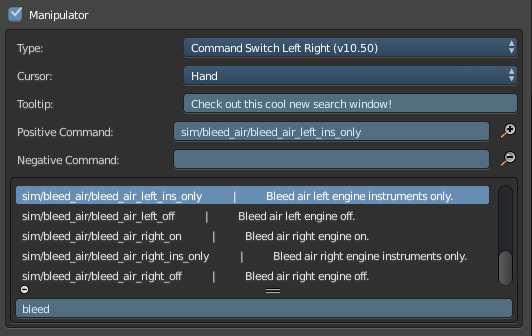
Command Search Window
Thanks to #361, just like the Datarefs.txt Search Window, we now have the same capabilities for searching Commands.txt (for manipulators). We are shipping with X-Plane’s latest Commands.txt file, but of course you can replace it with your own (as long as you keep the name the same). One day we hope to make it much more flexible.
Particle Emitters (not very useful to most yet, I know)
Thanks to #358, some people who have access to X-Plane’s cutting edge particle code can use XPlane2Blender to specify particle emitters. Don’t worry, we’re all working as hard as we can to get these into the hands of others. Fortunately, XPlane2Blender users can hit the ground running the minute it drops!
Build Scripts And Test Runners
#302 and #307 – Are you a professional XPlane2Blender maintainer and developer (if so we should probably talk!) Then you need a better build script, and a test script to match! Introducing mkbuild.py, the build script for the modern developer! It creates, it tests, it renames without messy mistake prone human intervention! To top that off, how about a testing script that doesn’t give false positives!
It turns out that my teachers in college, a ton of engineering textbooks, and the internet in general all seem to understand what wings do. Also my airplane has wings, and those wings are designed to interact with the air as much as possible, so I can flight-test my airplane at any time (and I constantly do) to collect information about what the wings in said airplane do. And then I use the information from the several sources listed above to really dial in the flight dynamics in X-Plane. Without question, on my death-bed I will look back on my many flights flown while frantically scribbling down notes and flying the airplane at the same time fondly. This is a challenge that not enough people get to enjoy, and then turning that knowledge into a simulator that then turns into money for me… well, let’s just say I have very little to complain about. Read More